Keeping an older person or a person with a disability safe at home, and keeping the people who love them from worrying, is what assistive technology is designed to do.
Whether it’s a personal alarm, a motion sensor, or a voice-controlled speaker: the options are more practical and less complicated than most people expect. These are tools that support independent living for people who are older or have a disability and give families real peace of mind.
This guide explains the main types of smart tech for older and disabled people, what each one does, and what to think about before choosing.
Page contents
What is smart technology for older and disabled people?
Smart technology for older and disabled people refers to devices and systems that use digital connectivity to help people manage daily life, stay safe, and remain in contact with others.
Common smart technology solutions include personal alarms, medication reminders, motion sensors, and video calling tools.
Types of assistive technology
The range of devices is wide. This can make it difficult to know which solutions will offer the best support for an ageing loved one.
The sections below cover the main categories, what each does in practice, and who tends to benefit most.
Personal alarms and fall detectors
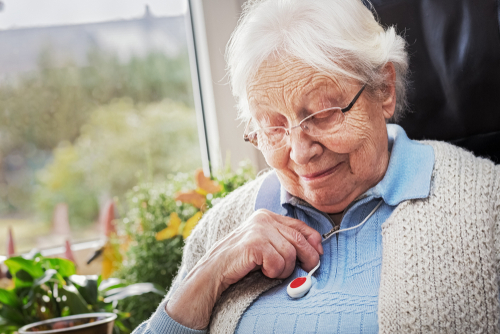
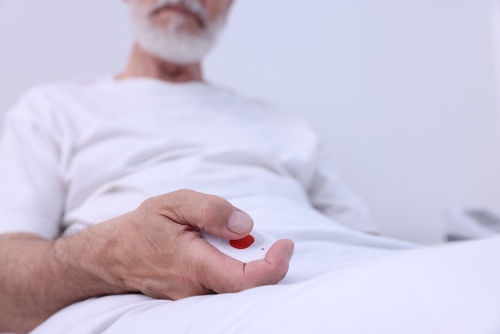
A personal alarm is a wearable device, usually a pendant or wristband, that connects to a response centre or named contact at the press of a button.
Fall detectors go further. They recognise the motion pattern of a fall and send an alert automatically, even if the person cannot press a button.
For someone with Parkinson’s disease who lives alone, a fall detector worn on the wrist provides a layer of protection a standard alarm cannot.
Fall detectors are not infallible, though. A sudden movement while gardening can sometimes trigger a false alert.
Voice-controlled devices
Voice-controlled devices such as Amazon Echo or Google Nest let someone control parts of their home and get information using spoken instructions.
For a person with arthritis, limited hand strength, or early-stage memory difficulties, being able to say “remind me to take my tablets at 8” or “call my daughter” without touching a phone can be really helpful.
These devices are always listening for their wake word (a specific word or phrase spoken to activate a device). An older loved one may be uncomfortable with this. So you may need to have a conversation about it before installation.
Smart home devices
Smart home devices include automatic lighting, programmable heating, and smart plugs that can be controlled remotely.
Motion-activated lights in hallways reduce the risk of a trip in the dark.
A family member can also check whether the heating is on, or switch off a kettle left running, from a phone, without the person who is older or has a disability needing to do anything.
Medication reminders and dispensers
Automated medication dispensers release the correct doses at set times and lock the remaining supply to prevent accidental double-dosing.
Simpler reminder-only devices work well for people who will take their medication if prompted but sometimes lose track of whether they already have.
For anyone managing several medications at different times of day, either type removes a significant source of daily error.
Monitoring devices and telecare
Telecare uses sensors placed around the home to build a picture of someone’s daily patterns. A sensor on the front door, kitchen cupboards, or bathroom can show whether normal activity is happening, without any effort from the person being monitored.
Monitoring devices worn on the wrist can also track heart rate and sleep quality. If the pattern changes, a carer or family member receives an alert before things reach a crisis.
Communication tools
Video calling on a tablet or a dedicated device lets an older person see and speak to family who cannot visit in person. Some tablets are designed specifically for older people and those who are disabled, with larger text, simplified menus, and a small number of pre-set contacts.
Staying connected to family and friends matters for emotional health as much as physical safety. The NHS links loneliness and isolation in older people and those with disabilities to poorer physical health and a greater risk of cognitive decline.
Benefits of smart tech for older and disabled people
Understanding how technology helps older and disabled people live at home starts with the most important benefit: staying in their own home for longer.
It does not replace care, but it can extend the period during which someone manages safely with less hands-on support.
That matters to the person, who keeps their familiar surroundings and routines, and to the family who worries about what might happen when they are not there.
Beyond safety, smart tech can help in several areas of daily life such as:
- Voice reminders can support medication routines
- Smart heating keeps the house warm without requiring anyone to manage the controls
- Video calls reduce the isolation that comes with reduced mobility.
For family carers, an activity sensor that confirms normal morning movement can enable them to step back slightly without losing oversight, especially if they are unable to visit every day.
What to consider when choosing assistive technology
Not every device suits every person. These three principles will help you find a tech solution that will help your loved one.
Identify the issue, not the technology
Start with what the person finds difficult or worrying, then look for something that directly addresses the issue.
The best device is the one that actually gets used. A fall detector worn every day is worth far more than a sophisticated wearable left in a drawer.
Focus on ease of use
Prioritise simplicity over features. A person with moderate dementia may get real benefit from a loud medication alert but find a tablet too confusing to manage consistently.
Someone with arthritis might find voice control far more practical than any touchscreen.
If you are unsure what will work, an occupational therapist can assess the person’s needs and recommend specific devices.
Check the costs
Before you make a decision, weigh up the ongoing costs and any setup requirements.
Ongoing costs are easy to overlook. Many telecare services charge a monthly monitoring fee on top of the device cost, which can add up quickly. It is worth asking your local authority whether telecare equipment is available free or at a reduced rate as part of a social care assessment before paying privately.
Setup requirements are worth checking before you buy. Some devices need a reliable home broadband connection; others work on mobile networks. Consider who will configure the device initially and who the person can call if something stops working. A device with no ongoing support plan is a risk, particularly for someone living alone.
Make the decision together
Their comfort with being monitored matters as much as the technology’s capabilities. A device someone resents wearing, or has quietly unplugged, helps no one. Where someone may lack the capacity to decide for themselves, decisions should be made in their best interests using the guidelines of the Mental Capacity Act 2005.
How to get started with smart technology
Start small and start slow. Choose one device that addresses a specific concern rather than buying a package of things at once.
If someone has already had a fall, a fall detector is the right starting point, not a full smart home setup.
An occupational therapist can help narrow down the options if you are unsure where to begin. You should be able to get a referral through your GP or local authority.
Once the device is in place, show the person how it works and let them try it at their own pace. A medication dispenser, for example, works best if the person has had a few days to get used to the alert sound and the routine before anyone starts relying on it. Give it time before adding anything else.
How carers and home care services can help
A care worker visiting someone at home is often the most practical source of ongoing support when technology is involved. They can check:
- That a device is charged and being worn
- Help someone who is struggling with a new piece of equipment
- Flag to the family if something has stopped working.
If you do not have any care and support at home, you can look for a carer at homecare.co.uk.
Technology gives care workers and families better information. If a morning sensor shows someone has been up, made tea, and opened the back door, the care worker arriving later already knows it has been a normal morning.
Combining data monitoring with direct observation is more useful than relying on either alone. A care worker also notices things sensors cannot, such as a change in mood, a drop in appetite, or signs that someone is managing less well physically. Age UK has practical guidance on arranging home care. Carers UK offers support for family carers working through care decisions.
FAQs
What is the difference between a personal alarm and a telecare system?
A personal alarm is a single device that lets someone call for help when they press a button. Telecare is a broader system that may include a personal alarm alongside home sensors, fall detectors, and monitoring equipment that sends automatic alerts. Personal alarms are simpler and cheaper; telecare systems offer more comprehensive coverage but usually involve a monthly service fee.
Does smart technology work for someone with dementia?
Some smart technology works well for people living with dementia such as automatic medication dispensers, motion-sensor lighting, and fall detectors. They help because they do not require the person to remember how to use them. Voice-controlled devices and tablets may be harder to manage for someone with moderate or advanced dementia. The Alzheimer’s Society has specific guidance on assistive technology and dementia.
Can technology replace a care worker?
No. Smart technology can help someone manage more independently at home and give useful information to carers, but it cannot replicate what a care worker does. Care workers provide direct personal care, skilled observation, and human connection that no device can offer.